2.2.1 Understand the need to check for errors after data transmission and how these errors can occur
2.2.2 Describe the processes involved in each of the following error detection methods for detecting errors in data after transmission: parity check (odd and even), checksum and echo check.
2.2.3 Describe how a check digit is used to detect errors in data entry and identify examples of when a check digit is used, including international standard book numbers (ISBN) and bar codes
2.2.4 Describe how an automatic repeat query (ARQ) can be used to establish that data is received without error.
Data accuracy/integrity during data transmission:
During data transmission it is possible that data can be damaged through circuitry issues, signal attenuation, electromagnetic interference or cross talk when the signal is travelling via cables. Data could also be deliberately changed or corrupted during data transmission. In some stages data might be completely unreadable in other cases it is possible that binary representations of 1 is changed to a 0 and 0s to 1s. There are three common methods of checking if data has been received with all BIT's still as original.
- Parity Check
- Checksum
- ARQ
SECTION 1 | PARITY CHECK
With even parity, the parity bit is set so that the total number of 1s in the data, including the parity bit, is even.
Example:
- Data = 1010110
- Number of 1s = 4
- Since 4 is already even, the parity bit is 0.
If the data were 1010010, which has three 1s, the parity bit would be set to 1 to make the total number of 1s equal to four.
With odd parity, the parity bit is set so that the total number of 1s in the data, including the parity bit, is odd.
Example:
- Data = 1010110
- Number of 1s = 4
- Since 4 is even, the parity bit is set to 1 to make the total number of 1s odd.
When the data is received, the receiving device recalculates the parity using the same method. If the parity does not match the expected result, an error is detected.
Parity checks can detect single bit errors but cannot detect all types of errors. For example, if two bits change during transmission, the parity may still appear correct and the error will not be detected.
A block of data uses even parity. The binary data sent is:
Which parity bit should be added before transmission?
SECTION 2 | PARITY BYTE & PARITY BLOCK CHECK
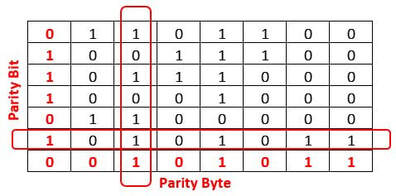
Instead of adding one parity bit to an entire block of data, a parity byte adds a parity bit to each byte of data. A byte is a group of 8 bits, so each byte has its own parity bit calculated separately.
For each byte, the number of 1s is counted and a parity bit is added using either even parity or odd parity. This means every byte transmitted includes an extra bit that allows the receiver to check that individual byte for errors.
Example using even parity:
- Byte of data = 10101100
- Number of 1s = 4
- Since the number of 1s is even, the parity bit added to this byte is 0.
If a different byte had an odd number of 1s, the parity bit would be set to 1 so that the total number of 1s in that byte becomes even.
When the data is received, the receiving device checks each byte separately by recalculating its parity. If a byte fails the parity check, an error is detected in that specific byte.
Using a parity byte makes it easier to identify which part of the data contains an error, compared to using a single parity bit for the whole block. However, like all parity methods, parity bytes can still fail to detect errors if an even number of bits change within the same byte during transmission.
Parity bytes are often mentioned alongside parity blocks in more advanced error detection methods, but at GCSE level they help reinforce the idea that parity checking can be applied to smaller units of data rather than just a whole message.
| Byte | Bit 1 | Bit 2 | Bit 3 | Bit 4 | Bit 5 | Bit 6 | Bit 7 | Bit 8 | Row parity |
|---|---|---|---|---|---|---|---|---|---|
| Byte 1 | 1 | 0 | 1 | 0 | 1 | 1 | 0 | 0 | 0 |
| Byte 2 | 1 | 1 | 0 | 1 | 0 | 0 | 1 | 1 | 0 |
| Byte 3 | 0 | 0 | 0 | 1 | 1 | 1 | 1 | 0 | 1 |
| Byte 4 | 0 | 1 | 0 | 0 | 1 | 0 | 0 | 1 | 0 |
| Column parity | 0 | 0 | 1 | 0 | 0 | 0 | 0 | 0 |
The data uses even parity for both rows and columns (a parity block). One data bit has changed during transmission. Click the bit you think is incorrect, then click Check answer.
Tip: Find the row (byte) that fails even parity, then find the column (bit position) that fails even parity. The incorrect bit is where they cross.
| Byte | Bit 1 | Bit 2 | Bit 3 | Bit 4 | Bit 5 | Bit 6 | Bit 7 | Bit 8 | Row parity |
|---|---|---|---|---|---|---|---|---|---|
| Byte 1 | 0 | ||||||||
| Byte 2 | 1 | ||||||||
| Byte 3 | 0 | ||||||||
| Byte 4 | 1 | ||||||||
| Column parity | 0 | 0 | 1 | 0 | 1 | 0 | 0 | 0 |
SECTION 3 | CHECK SUM
Before transmission, the data is split into blocks or bytes. These values are added together using a predefined method to produce a single value called the checksum. The checksum is then sent along with the original data.
Example process:
- Data values = 12, 45, 7
- Checksum calculation = 12 + 45 + 7 = 64
- The checksum value 64 is sent with the data.
When the data arrives at the receiving device, the same calculation is carried out on the received data values. The newly calculated checksum is then compared with the checksum that was sent.
If the two checksum values match, the data is assumed to have been transmitted correctly. If the values do not match, an error is detected and the data may be requested again.
Checksums are more reliable than parity checks because they can detect a wider range of errors, including some multiple-bit errors. However, they cannot detect all possible errors. Different data values can sometimes produce the same checksum, meaning some errors may go undetected.
Checksums are commonly used in data transmission and storage systems where a simple but effective method of error detection is required.
| Byte position | Byte (binary) | Byte value (denary) |
|---|---|---|
| Byte 1 | 00001100 | 12 |
| Byte 2 | 00101101 | 45 |
| Byte 3 | 00000111 | 7 |
| Checksum | 01000000 | 64 |
A block of data is split into three values: 20, 15 and 5. A simple checksum is created by adding the values together. Which checksum value should be sent with the data?
SECTION 4 | CHECK DIGITS
The check digit is calculated before the data is used or transmitted and is stored or sent as part of the number. When the number is entered again or received, the same calculation is repeated. If the result does not match the check digit, an error is detected.
Check digits are mainly used to detect data entry errors rather than transmission errors. They are particularly useful for catching common mistakes such as typing the wrong digit or swapping two digits around.
A common example of a check digit is an ISBN used for books. The final digit of an ISBN is a check digit that is calculated from the other digits. When an ISBN is entered into a system, the check digit is checked to make sure the number has been entered correctly.
Another example is bar codes used on products in shops. The bar code includes a check digit that allows the checkout system to detect if the number has been scanned incorrectly.
Check digits can detect many common errors, such as a single incorrect digit or two digits being entered in the wrong order.
However, they cannot detect all possible errors, and passing a check digit test does not guarantee the data is correct.
Check digits help improve accuracy and reliability when large amounts of numerical data are entered into computer systems.
What is the main purpose of using a check digit?
SECTION 5 | ARQ - AUTO REPEAT REQUEST
Positive and negative acknowledgements, and timeouts are used when a sender transmits a data packet, it waits for an acknowledgement from the receiver. If the receiver successfully receives the data packet, it sends a positive acknowledgement (ACK) back to the sender. The sender can then send the next packet.
If the sender does not receive an acknowledgement within a certain time period, known as a timeout, it assumes that the data packet was lost or corrupted during transmission. The sender then retransmits the data packet. This process of retransmission continues until the sender receives a positive acknowledgement from the receiver.
In the case where the receiver detects an error in the received data packet, it sends a negative acknowledgement (NAK) back to the sender. The sender then retransmits the data packet.
By using positive and negative acknowledgements and timeouts, ARQ is able to ensure reliable data transmission even in the presence of errors or losses in the communication channel. The protocol can also adjust to changes in the communication channel conditions, such as increased packet loss or delay, by adjusting the timeout value and retransmission parameters.
Which statement best describes how Automatic Repeat Query (ARQ) works?
SECTION 6 | ECHO CHECK
When data is sent from the sender to the receiver, the receiver immediately sends an exact copy of the received data back to the sender. This returned data is called the echo.
The sender then compares the echoed data with the original data that was sent. If both sets of data match exactly, the transmission is assumed to be correct. If there are any differences, an error is detected.
Example process:
- A sender transmits the data 101101.
- The receiver sends back 101101 as the echo.
- The sender compares the original data and the echo.
- If they are the same, the data is accepted.
If the echoed data does not match the original data, the sender knows that an error has occurred and can resend the data.
Echo checking is simple to understand and does not require complex calculations. However, it doubles the amount of data being transmitted because every message must be sent twice.
Echo checks can detect many transmission errors but are inefficient and not suitable for large amounts of data or high-speed networks. For this reason, they are mainly used in simple systems or to demonstrate basic error detection concepts.
How does an echo check detect errors in data transmission?
- Data gain: Data gain refers to the situation where the signal power received at the receiver is higher than what was transmitted. This can lead to the receiver interpreting the signal as containing more data than was actually transmitted, resulting in data corruption or loss. Data gain can be caused by factors such as signal amplification, changes in the transmission medium, or the use of different equipment at the transmitter and receiver.
- Data loss: Data loss occurs when data is not received by the receiver, either because the signal power is too low or because the data has been corrupted during transmission. Data loss can be caused by a variety of factors, including signal attenuation, network congestion, or errors in the transmission equipment.
- Data change: Data change occurs when the transmitted data is received by the receiver, but it has been altered in some way during transmission. This can be caused by errors in the transmission equipment, interference from other signals in the network, or intentional tampering by a malicious actor. Data change can lead to errors or inconsistencies in the received data, potentially causing significant problems for the recipient.
To mitigate these issues, various techniques are used in data transmission, such as error correction codes, signal amplification, and encryption to protect the data and ensure that it is transmitted accurately and securely.
- Error Checking | A process to ensure that data transmitted from one device or component to another is not corrupt or damaged during transfer.
- Data Integrity | The accuracy and consistency of data over its lifecycle, particularly during input, transmission, and reception.
- Parity Check | A method used to detect errors in data transmission. It involves adding an extra bit (parity bit) to make the number of 1s in a string of bits either even (even parity) or odd (odd parity).
- Parity Bit | A parity bit is an extra bit added to a set of data bits to ensure parity, a form of error detection. It is used to make the total count of 1s in the data either even (even parity) or odd (odd parity). When data is transmitted, the parity bit helps in detecting single-bit errors by comparing the parity of the received data with the expected parity.
- Parity Byte | Similar to a parity bit, a parity byte is an additional byte added to data for error detection. Instead of just adding a single bit, a parity byte extends the concept to eight bits. It is often used in more complex data structures or transmission protocols where a single bit of error checking might not be sufficient.
- Parity Block | A parity block refers to a block of data (which could be several bits or bytes in size) used specifically for parity-based error checking in larger data transmissions. In systems where data is transmitted in blocks, a parity block is added to these data blocks. This method is more robust and is typically used in storage systems and advanced communication protocols to ensure the integrity of a large set of data, as it can detect and sometimes correct more complex error patterns.
- Checksum | A technique where the numeric values of bytes in a data block are summed. This total is sent along with the data, allowing the receiver to check if the sum of received bytes matches the checksum value, indicating whether the data is intact.
- Check Digits | A digit added to a string of numerical digits (like in ISBNs or barcodes) to detect errors in data entry. It is calculated using a specific formula and helps verify the accuracy of the entered data.
- ARQ (Auto Repeat Request) | A protocol in data transmission that involves the use of acknowledgments and timeouts to ensure error-free data reception. It includes positive and negative acknowledgments from the receiver and retransmissions by the sender in case of detected errors or no acknowledgment.
- Echo Check | A method where a test packet of data is sent and then echoed back by the receiver for comparison, ensuring accurate and complete data transmission.
- Data Gain | An increase in signal power at the receiver's end compared to what was transmitted, potentially leading to data corruption.
- Data Loss | Occurs when data is not received or is received incompletely due to low signal power or data corruption during transmission.
- Data Change | Happens when transmitted data is altered in some way during transmission, leading to errors or inconsistencies in the received data.
- Timeout (Auto Repeat Request) | In the context of ARQ, a timeout is a predefined time period set by the sender of a data packet. If the sender does not receive an acknowledgment (ACK) or a negative acknowledgment (NAK) from the receiver within this time period, it assumes that the data packet was lost, corrupted, or not received. As a result, the sender will automatically retransmit the data packet. The concept of a timeout is crucial in ARQ protocols to handle situations where acknowledgments are delayed or lost, ensuring reliable data transmission even in unstable or error-prone communication channels.
- What is data loss in the context of data transmission errors?
- What is data gain in the context of data transmission errors?
- What is data change in the context of data transmission errors?
- What is a parity byte check in data transmission and how does it work?
- What is a parity block check in data transmission and how does it work?
- How does interference impact data transmission and what are some common forms of interference?
- How does the use of parity checks help to detect and prevent data transmission errors?
- What is the difference between parity byte checks and parity block checks in data transmission?
- How can the use of error correction techniques help to reduce the impact of data transmission errors?
- What is the role of redundancy in reducing the impact of data transmission errors during data transmission?
|
|
|