COMPUTER SCIENCE CAFÉ
  • WORKBOOKS
  • BLOCKY GAMES
  • GCSE
    • CAMBRIDGE GCSE
  • IB
  • A LEVEL
  • LEARN TO CODE
  • ROBOTICS ENGINEERING
  • MORE
    • CLASS PROJECTS
    • Classroom Discussions
    • Useful Links
    • SUBSCRIBE
    • ABOUT US
    • CONTACT US
    • PRIVACY POLICY
  • WORKBOOKS
  • BLOCKY GAMES
  • GCSE
    • CAMBRIDGE GCSE
  • IB
  • A LEVEL
  • LEARN TO CODE
  • ROBOTICS ENGINEERING
  • MORE
    • CLASS PROJECTS
    • Classroom Discussions
    • Useful Links
    • SUBSCRIBE
    • ABOUT US
    • CONTACT US
    • PRIVACY POLICY
COMMUNICATION TECHNOLOGIES
2.4 DATA TRANSER MEDIUM
Picture
WHAT IS IN THIS SECTION
This section discusses the physical medium that carries the data and the transmission and receiving of data.
WIRES, CABLES AND WIRELESS
When talking about data transfer we mean the transfer of binary digits 1s and 0s, these are represented by electrical signals or pulses of light or radio waves. Currently nearly all data transferred from one device to another are sent via cables. Even if your device is wireless, the wireless part of the data transmission is usually just a short distance. Many cables are laid all over the world and under the oceans. Copper cables generally carry the data over short distances and optical cables over long distances.
This principle is slowly changing and the launch of Elon Musk's Starlink satellites is speeding up further changes to how data is transferred.
CABLE TYPES
There are three main mediums through which data is transferred over networks:
  • Optical Cable
  • Copper Cable
  • Wireless
The copper cables can be broken up into two main categories; coaxial cable and twisted pair. Although coaxial cable is not often the first choice of cable it has been very useful in the development of networks because a large amount of coaxial cable had previously been installed for other purposes and has formed a quick fix as network technologies have developed. Twisted pair cable is mainly used in local area networks as it is relatively cheap to buy and quite robust which makes installation within buildings easy. Optical cable is expensive to buy however it has very fast data transfer rates, therefore it is the cable of choice for long distance data transfer.
See the table below for more details on each cable:
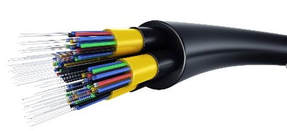
OPTICAL CABLE: Made from many strands of optical fibre, it is used for long distance data transfer or where speed is critical.
Picture
Advantages:
  • Very fast data transfer
  • Difficult to hack
  • Not susceptible to interference
  • High bandwidth capabilities
​Disadvantages:
  • Expensive to buy
  • Data corruption over a short distance so it needs repeaters - signal spreading with distance thus limiting how closely data can be packed without overlapping
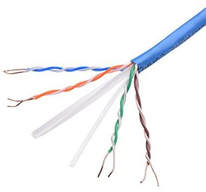
COPPER TWISTED PAIR: Currently often referred to as Cat 5 cable. It has pairs of copper twisted cable, they are twisted to reduce interference, it also has an aluminum shield and a drain wire. Cat 6a cable has a high bandwidth. (UTP- Unshielded Twisted Pair)
Picture
Advantages:
  • Low cost
Popular use makes it an easy compatible option with no bridge required.
Disadvantages:
  • Older Cat rated cable has a low bandwidth
  • It can be affected by interference
  • It needs repeaters when used for long distances
  • It is easy to hack
Crosstalk is interference from one cable to another. Because cables often run in the same cable trunking and run parallel to each other crosstalk is able to happen. Using twisted pairs of wires and shielded twisted pairs of wires helps minimise this effect. 
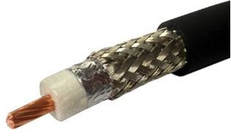
COAXIAL CABLE: A single copper cable covered with a dielectric insulator and a metallic shield then a plastic sheaving.
Picture
Advantages:
  • Many pre-installed cables could be used to initially develop networks
  • It is not very susceptible to interference
  • High frequency range
Disadvantage:
  • Cost for performance ratio is not good
  • It is easy to hack
  • Susceptible to damage and lightning strikes
WIRELESS
Whilst cabled connections are known as guided medium because the send the data to the exact user that it needs to be delivered too, wireless medium is known as unguided because it simply sends out the signal with no focus to the direction it should be travelling, providing use is in range of the send signal the user will receive the data.
Wireless data is mainly transmitted in three different bands of radio frequency or via optical medium.
Radio transmission is often divided into the following three categories:
  • Radio – 3KHz – 3GHz
  • Microwave – 3 – 300 GHz
  • Infrared – 300 GHz – 400Thz
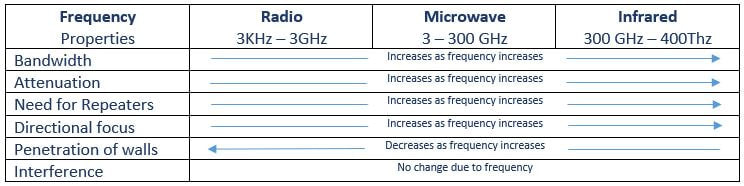
As the frequency of the transmission increases the properties of the signal changes, there are advantages and disadvantages for each frequency. For example, an infrared signal does not easily pass through walls, this makes it perfect for use within the home as the data will not travel to your next door neighbor and affect their home devices, when you change the channel on your TV, luckily it does not chance on your neighbor’s TV also.
See the table below which illustrates how the frequency of the signal affects its properties.
Picture
Frequency Chart
The frequency the public is allowed to use is very strictly regulated, it cannot interfere with frequencies allocated to other tasks and it cannot be transmitted at a frequency that is damaging to life. Microwave Signal is at the top end of acceptable transmittable frequency in a band known as UHF or Ultra High Frequency to EHF Extremely High Frequency.

​
Wireless technologies can also interfere with each other and produce crosstalk​, using various frequencies can help minimise this.
Satellite use radio signal also and the frequencies they used are very mixed depending on the purpose of the satellite.
Wifi has a reasonably high frequency and has a moderate ability to penetrate walls and the signal will travel around 100m before deterioration depending on the environment. These features make Wifi a good solution for signal distribution in the home or in offices and work places.
WiMax good ability to penetrate walls and the signal will travel around 30km before deterioration depending on the environment. Speeds of around 70Mbps.
Lifi (Light Fidelity) uses LED lights within a building to distribute the signal. LiFi is very high speed and can transfer data at around 200Gbps. A photodetector is needed to receive the light signal, the light is transmitted by dimming and dipping the light at a range undetectable by humans, the receiver picks up the transmitted light and the change in signal is converted back to binary data representation. Lifi signals cannot pass through walls, plus the lights need to be on at all times Lifi is being used.
Bluetooth is used for short range data transmission and works on a frequency of around 2.5 GHz. Because Bluetooth can be found in many different technologies such as speaker systems and data devices such as heart rate monitors it have become a good medium to pair your device and transfer data. Bluetooth is normally less demanding on the device battery than Wifi but when left on when not needed it can significantly drain your battery.
Gateway – As many systems use different technologies a gateway is a component used as an intermediate to allow connection between devices and networks. For systems with different protocols a gateway is necessary to allow communication.
SATELLITE USAGE
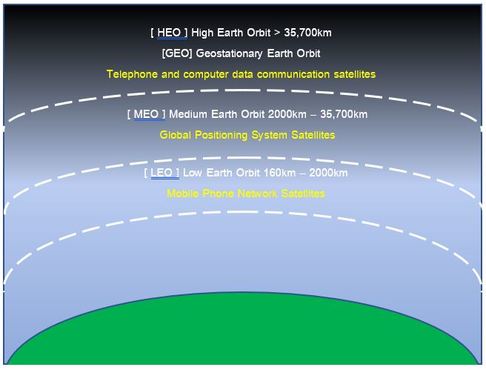
Whilst satellite technology has been in use for a long time it has only recently started to become common use for internet data transfer. There are currently a few companies that provide or working towards providing satellite based internet service such as Hughes Web with satellites in geostationary orbit at about 22,000 high, OneWeb with satellites in low earth orbit. And Musk's Starlink which is currently the fastest growing and looking to be the dominant provider in the near future.
Picture
Satellites in low earth will have less latency due to the distance data needs to travel, however all satellite internet still have problems with providing a stable connection and scaling up. Currently users need to have a satellite dish with a clear view of satellites and even a small tree coverage can disrupt the signal, as can be seen in the frequency chart above when the frequency of a signal increases its ability to penetrate objects decreases. The signal can penetrate clouds and service generally continues except for the occasional outage in exceptionally heavy storms.
Picture
1: Give a benefit of using optical cables over long distance data transfer
2: Why are optical cables often not used for short distances inside buildings?
3: As a wireless frequency increases how does this effect the penetration of objects such as walls to the signal?
4: In what way were coaxial cables a great benefit to the early internet?
5: Give one way in which electro magnetic interference be reduced when using copper cables?
Picture

NEXT: TRANSMISSION PROTOCOLS
Picture
SUGGESTIONS
We would love to hear from you
SUBSCRIBE 
To enjoy more benefits
We hope you find this site useful. If you notice any errors or would like to contribute material then please contact us.